Advance Reordering User Guide
Completed
Analysis
2221 Views •Getting started
2010 Views •Features
1928 Views •Operational Guide
1928 Views •Analysis from Reordering Rule Created/Updated
1907 Views •Operational Guide
1834 Views •Create Reordering Rule (Manual)
1830 Views •Operational Guide
1824 Views •Operational Guide
1805 Views •Auto Process for Reordering Rule
1802 Views •Terminologies
1791 Views •Concluding points
1768 Views •Operational Guide
1751 Views •Update Purchase - Sales - IWT History (Manual)
1721 Views •Features
1709 Views •Features
1674 Views •Features
1623 Views •Update Purchase - Sales - IWT History (Manual)
Update Sales History or Purchase History or IWT History
To Update the Sales History / Purchase History / IWT History that is considered while calculating accurate Minimum Quantity & Maximum Quantity manually navigate to
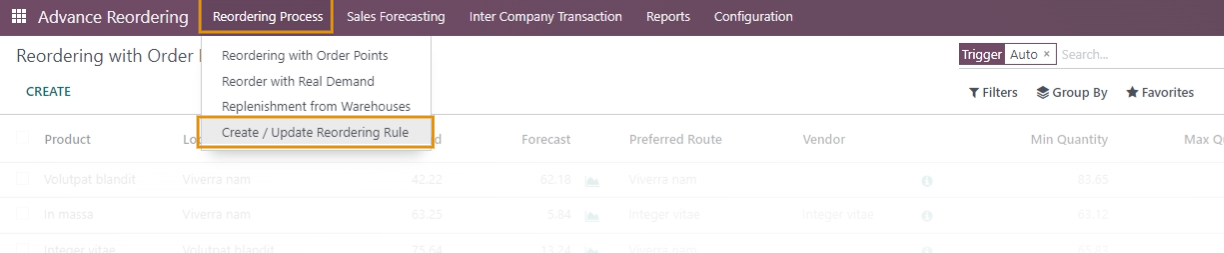
- Reordering Process / Create/Update Reordering Rule

Select either Sales History or Purchase History or IWT History Operation in the wizard that opens as shown below.
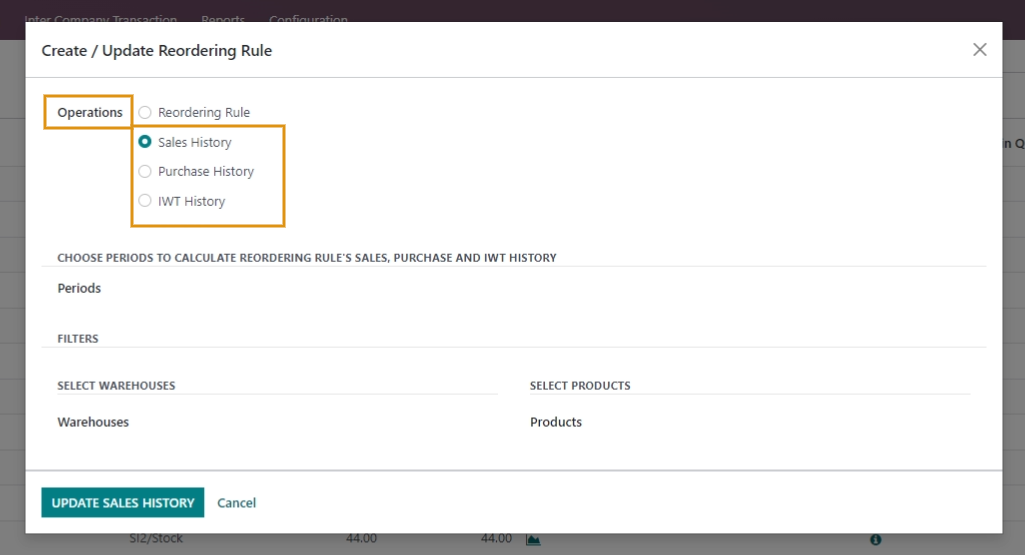
Choose Period to calculate Sales History or Purchase History or IWT History of Reordering Rule.
For either of the cases select the Warehouses and products for which you wish to Update your Sales History or Purchase History or IWT History.
Update the Sales History or Purchase History or IWT History.
Please Note:
1. If no warehouses and Products are selected then Sales History, Purchase History, or IWT History of reordering rules will be Updated for all products and all Warehouses.
2. This is a manual method to create/Update the Reordering rule.
3. By default, the reordering rules will be updated in Automated Method after the time period set in Configuration Settings.
Commenting is not enabled on this course.